
Roblox Error Codes List: Meanings and Solutions
Roblox is one of the world’s most popular online gaming platforms, with millions of players logging in daily to create, share, and explore virtual worlds. But nothing ruins the fun faster than a mysterious error code flashing on your screen. Error 524, 279, 267… if you’ve played long enough, you’ve probably seen at least one of these. The good news? Every error has a reason - and a fix. In this guide, we’ll break down the most common Roblox error codes, explain what they mean, and show you simple steps to get back in the game fast
Why am I getting errors in Roblox?
Errors in Roblox can occur for a number of reasons. Here are the most common ones that thousands of players around the world encounter every day:
- Roblox server outages;
- Unstable internet connection or weak Wi-Fi;
- VPN or DNS issues;
- Account suspension or ban;
- Bugs in the game itself or on your device.
The Most Common Errors in Roblox
Below is a list of the most common errors encountered by players:
- Error 279 in Roblox
- Error 524 in Roblox
- Error 267 in Roblox
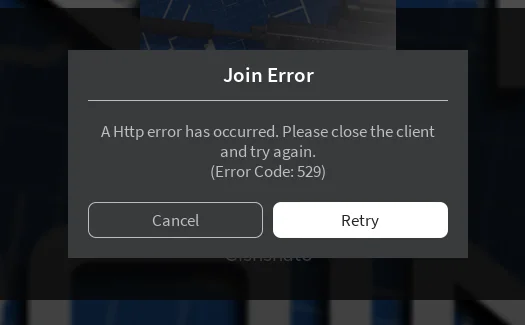
- Error 529 in Roblox
- Error 280 in Roblox
- Error 288 in Roblox
- Error 773 in Roblox
- Error 304 in Roblox
Why Does Error 279 Happen in Roblox?
- Unstable internet connection;
- Connection blocked by antivirus software or firewall;
- Old version of the Roblox client;
- Problems on the Roblox servers;
- Browser cache full;
- Problems connecting to a specific game, especially those with custom scripts and a large number of objects.
If errors appear after updates or when using scripts, it may be related to compatibility issues. You can read more about this in our guide on why Roblox scripts stop working.
How to Fix Error Code 279 in Roblox
- Check the status of Roblox servers: go to the official status website status.roblox.com. If technical work is indicated there, just wait for the work to be completed.
- Clear your browser cache: if you play Roblox through a browser, press Ctrl + F5 or manually clear the cache in the settings. Often, a large amount of temporary files causes connection errors.
- Restart your internet and device: turn off Wi-Fi, wait 10-15 seconds, and turn it back on. Also, restart your PC or phone.
- Reinstall Roblox: if you are using the version from the website, try installing Roblox from the Microsoft Store.
- Disable your antivirus or firewall: temporarily disable your antivirus or Windows Defender.
- Change your browser: the error may depend on the browser you are using. It is recommended to run Roblox through Chrome, Edge, or Firefox.
- Reset your network settings: Open the command prompt (cmd) as an administrator and enter: netsh winsock reset. Then restart your computer.
What to do if Error 279 only appears in certain Roblox games?
This means that the error is not global, but local — related to a specific game:
- The server may be overloaded or incorrectly configured;
- Prohibited scripts are being used;
- The map is not optimized (too many objects);
- Try another game — if everything works, the problem is not on your end.
Why does Error 279 appear on mobile?
- Problem with Wi-Fi or mobile data network
- Old version of Roblox
- Device RAM overload
Solutions:
- Update Roblox via Google Play or the App Store
- Clear the app cache
- Restart your phone
If you've tried everything and error 279 in Roblox still persists, the problem is most likely on the game's side. Sometimes servers are overloaded or undergoing maintenance, and the fix is only available over time.
Roblox Website Errors Explained
These errors can occur when logging into the game or downloading the client. They most often occur on the official Roblox website, especially if you access it through a browser. Here are the most common errors and what to do about them:
- Down For Maintenance - the platform is temporarily closed for maintenance. Just wait, it usually takes a couple of hours.
- ERR_TOO_MANY_REDIRECTS - the browser keeps reloading the page. To fix this, try disabling extensions, especially VPNs and ad blockers, clearing your cache and cookies, or accessing the site in incognito mode.
- 400, 500 - server errors. Most likely, Roblox is undergoing technical maintenance. Check the status on the official website or social media.
- 403 - access denied. You may have entered the wrong URL or your IP is temporarily blocked. VPNs can also affect this.
- 404 - page not found.
- 504 - problems with the Internet connection. Restart your router or connect via mobile Internet.
- 805 - temporary failure. Refresh the page several times - this usually helps.
How to Understand What a Roblox Error Code Means?
If you see an error code, it is not just a random set of numbers—there is a specific reason behind it:
- 524 - Problems connecting to the server, possibly banned.
- 279 - Roblox cannot establish a connection.
- 267 - Your account is restricted or blocked.
- 529 - Failure on the Roblox server side.
- 280 - The client is outdated and needs to be reinstalled.
- 773 - The game does not allow you to connect to the server.
- 304 - Use of scripts or cheats.
How to Fix Errors in Roblox?
Here are the basic steps that help resolve most game issues:
- Check your internet connection, especially on your phone via Wi-Fi.
- Disable VPN or proxy, as Roblox does not function well with them.
- Restart the game or clear your browser cache.
- Update Roblox to the latest version.
- Try a different account, especially if you suspect you've been banned.
- Restart your device - it's simple, but it often helps.
If you are using scripts and are not sure if everything is set up correctly, you can also read our guide on how to install Roblox scripts.
Roblox Errors on Mobile and PC - Is There a Difference?
Yes. For example, error 280 in Roblox is more common on PCs with outdated clients. Error 524 on a phone can be caused by poor mobile internet connection or router blockages. We analyze errors that occur on mobile devices and PCs separately so that you can find a solution faster.
Roblox errors can feel frustrating, but most of them are easier to solve than they look. Whether it’s a server outage, a weak internet connection, or just an outdated client, there’s almost always a fix. And if the problem is on Roblox’s side, the best solution is patience — check the official Roblox Status page or Twitter updates, grab a drink, and wait it out.
❓ Roblox Errors FAQ
Q: Why does Roblox keep showing error codes?
A: Most Roblox errors are caused by server outages, unstable internet connections, VPNs, or outdated game clients. Each error code points to a specific issue.
Q: How do I fix Roblox connection errors?
A: Start by checking your internet, disabling VPNs, and restarting Roblox. If the issue persists, update the client or clear your browser cache.
Q: Do Roblox errors on PC and mobile differ?
A: Yes. Some errors, like 280, are more common on PC due to outdated clients, while mobile users often see 524 because of weak Wi-Fi or mobile data.
Q: Is error 279 in Roblox permanent?
A: No. Error 279 usually means Roblox failed to connect to the server. Restarting your device, clearing DNS, or switching networks usually solves it.
Q: Where can I check if Roblox servers are down?
A: Visit the official Roblox Status page or Roblox’s official Twitter account for real-time updates on outages.