
Steal An Egg Script - Dr. Scramble Event, Auto Farm & More
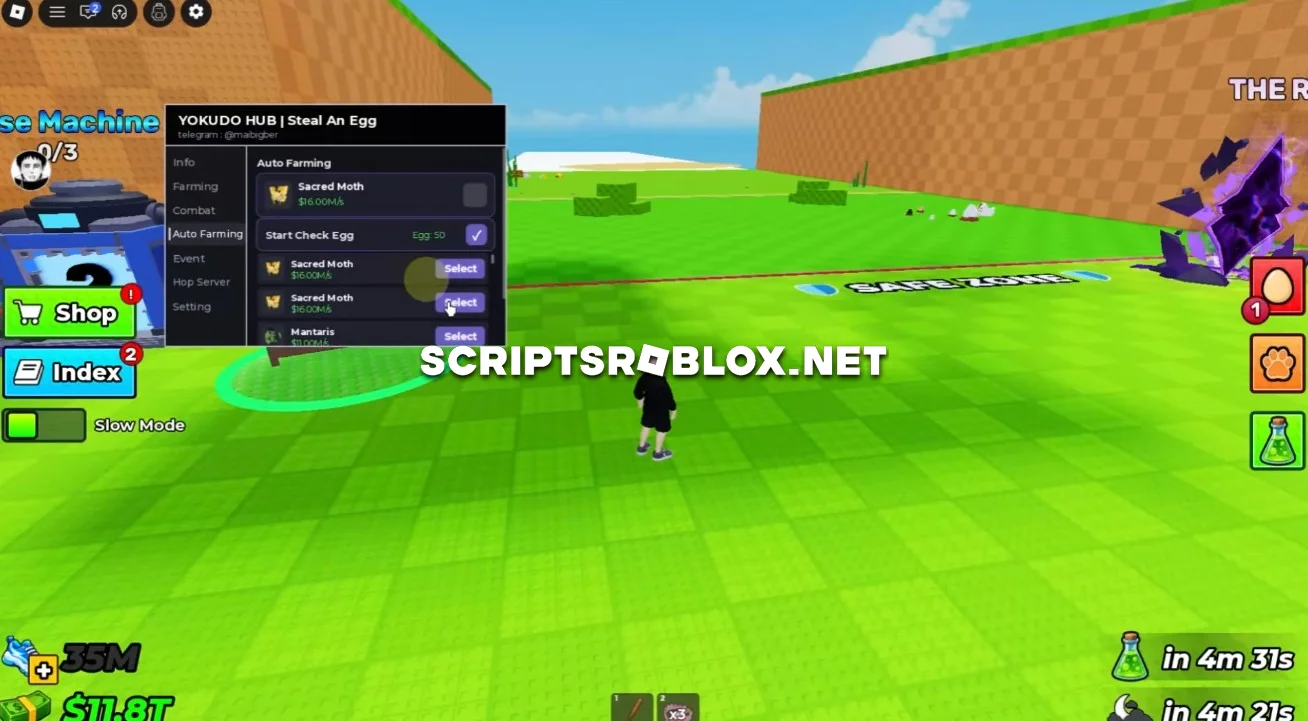
On this page, you can copy a new free script for the most popular Roblox game, Steal An Egg. It includes useful features such as Complete the Dr. Scramble Event, Combat, Auto Farming, Hop Server and more. The script is especially useful for completing the current event, farming Eggs and making combat easier. The script is very easy to configure thanks to its graphical interface; it works on both the PC and mobile versions of the game and does not require an activation key.
About Steal An Egg
In the game Steal An Egg, people play by stealing eggs, taking them to their base and collecting various pets. Eggs in this game have varying rarity levels, therefore, it is essential to be able to find good eggs in the game.
People can engage in various events in the game, fight others and make improvements on their bases. One of such events is the Dr. Scramble Event.
Steal An Egg Script Features
Complete the Dr. Scramble Event helps automate the event using the Attack Drone feature. This makes it easier to complete the event tasks without having to handle every action manually.
Combat includes Auto Equip Bat and Auto Hit Player, allowing you to automatically equip the Bat and attack nearby players.
Auto Farming allows you to select the Egg you want to farm and use Check Egg to look for the required Egg. This makes it easier to focus on specific Eggs instead of searching for them manually.
Hop Server allows you to quickly change servers, which can be useful when searching for specific Eggs or looking for a better server for farming.
The script also includes other features that help with farming, events and combat in Steal An Egg.
loadstring(game:HttpGet("https://raw.githubusercontent.com/betdoyvaka/stealanegg/main/Loader.lua"))()Supported Executors
You can execute this script using one of the supported Roblox executors below.
How to Use This Script
- Download and install a trusted executor.
- Open Roblox and join the game.
- Launch the executor on your Mobile Phone / Emulator.
- Paste the script code into the executor.
- Press Execute and enjoy the new features.
Tip: Always use trusted executors to avoid errors or bans.
Comments 0