
Huss Valley Script - Auto Dodge, Auto Farm, Esp, Win & More
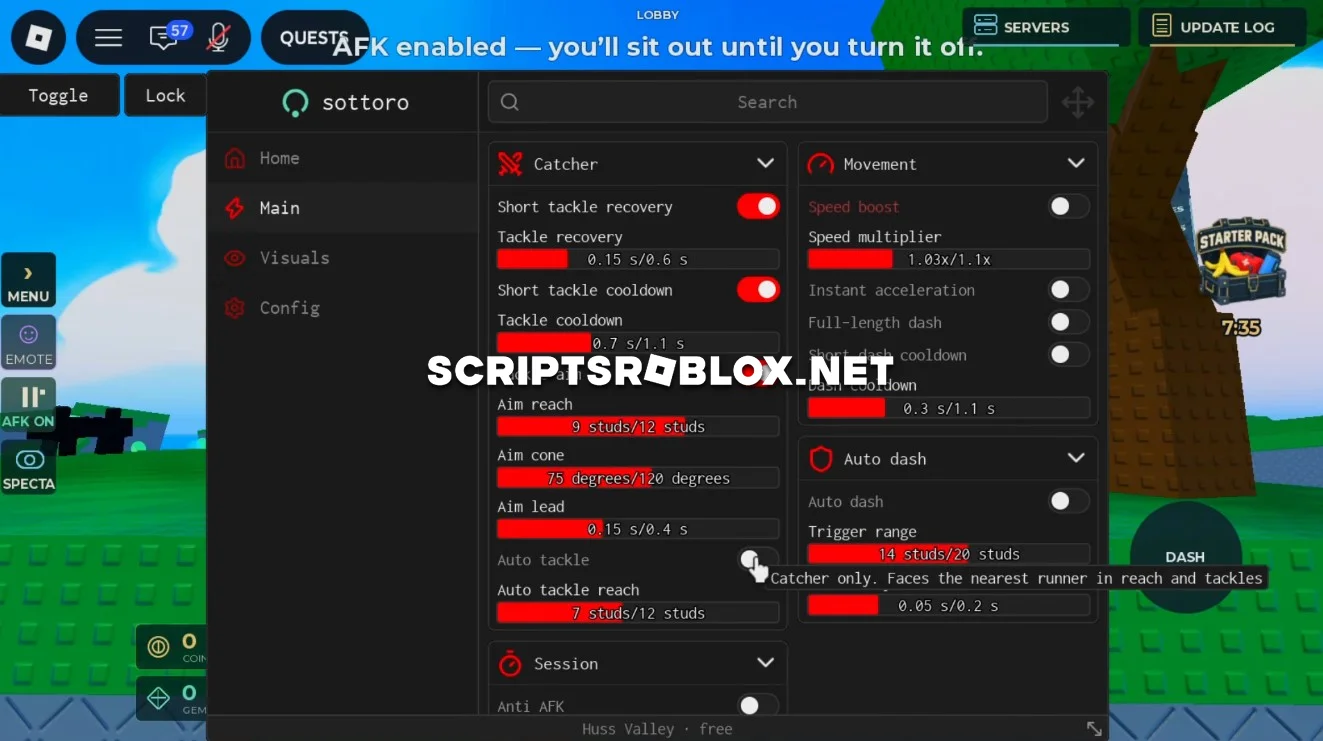
A free script has been developed for fans of the Roblox game Huss Valley, designed to automate slides and optimize movement during matches. It helps you recover after slides, aim at opponents, and automatically perform dashes, and it also offers movement and ESP settings for more effective gameplay. The script works reliably on all game platforms and features a graphical user interface that does not require a key to run.
About Huss Valley
Huss Valley is a Roblox game where movement, tackling and quick reactions are important during gameplay. Players need to keep up with opponents, make successful tackles and use dashes at the right moment.
The script automates some of these repetitive actions and gives you additional movement and visual options.
Huss Valley Script Features
- Auto Farm includes several tackle options such as Tackle Recovery, Tackle Cooldown, Tackle Aim and Auto Tackle. They make automation of the process possible as well as easier to compete with the others.
- Speed Boost improves your movement speed, and Instant Acceleration makes you move at your maximum speed much quicker.
- Auto Dash automatically performs dashes based on your settings. You can configure the Trigger Range and Dash Delay to control when and how often the dash is activated.
- Anti AFK keeps your character active and helps prevent being disconnected for inactivity.
- ESP provides several visual options, including Name, Distance, Box and Tracer, making it easier to see and track other players around the map.
The script also includes other features for movement, tackling and gameplay in Huss Valley.
loadstring(game:HttpGet("https://api.luarmor.net/files/v4/loaders/d792d2a2b58c6e3335851d13b4f4f3a3.lua"))()Supported Executors
You can execute this script using one of the supported Roblox executors below.
How to Use This Script
- Download and install a trusted executor.
- Open Roblox and join the game.
- Launch the executor on your Mobile Phone / Emulator.
- Paste the script code into the executor.
- Press Execute and enjoy the new features.
Tip: Always use trusted executors to avoid errors or bans.
Comments 0